Clients
Overview
Use the Clients screen to find registered Update Service clients, review their recent activity, and open their records. Clients can be end-user workstations or server-to-server Update Service instances. Select a client to open Client Detail.
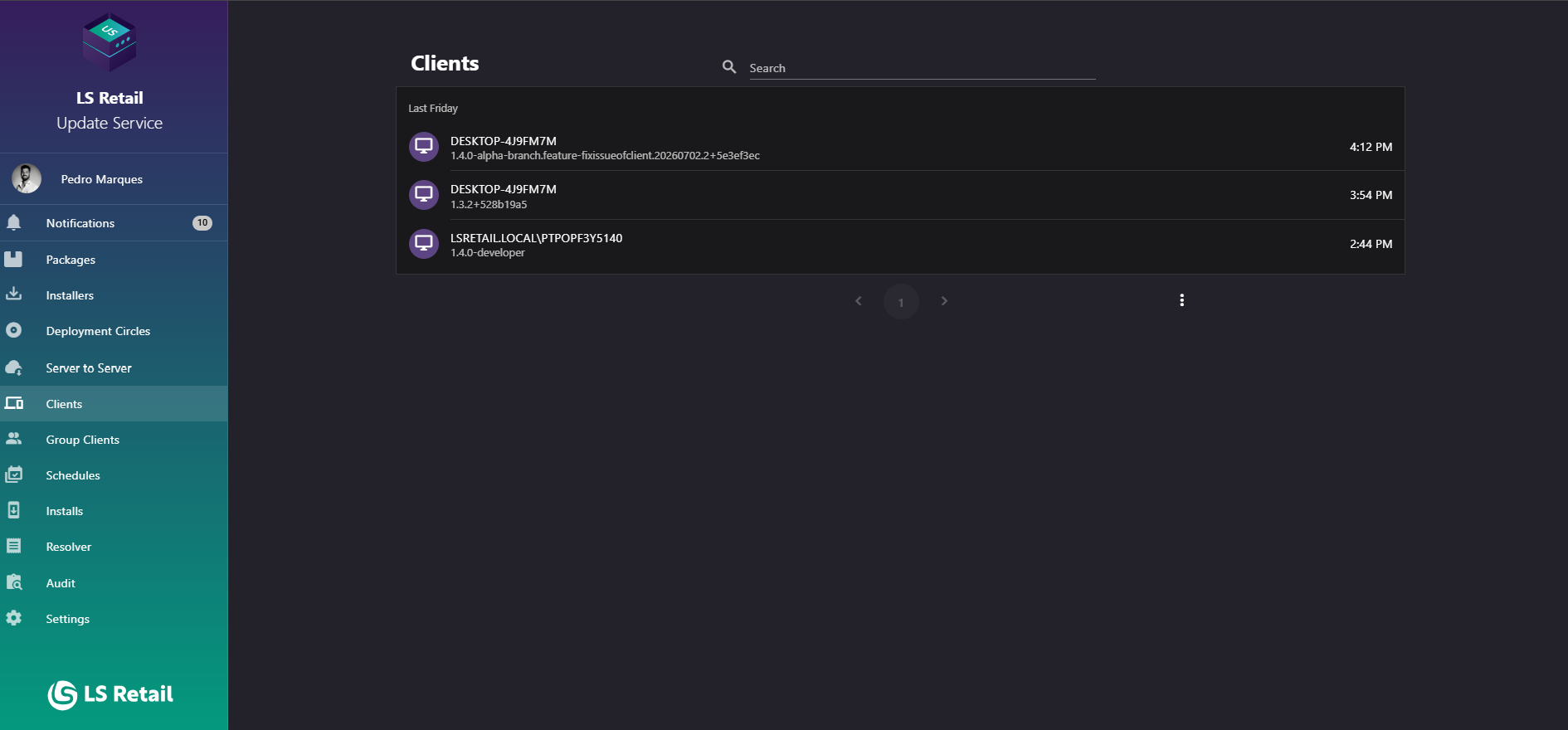
Figure: Interface overview of the Clients screen.
Key tasks
- Browse clients grouped by when they last contacted the server.
- Search by client information.
- Identify server-to-server and end-user clients by their row icons.
- Review each client’s host name, Update Service version, and last-seen time.
- Open a client record, including install history and deployment-circle assignments.
Interface elements
| Element / Field Name | Type | Description & Triggered Action |
|---|---|---|
| Search | Field | Filters the client list by host name or other identifying information. |
| Group heading | Section Header | Groups client rows by when clients were last seen, such as Today or This week. |
| Client list item | Grid/List Row | Each row shows an icon (a bank icon for a server-to-server client, a monitor icon for an end-user client), the client's host name (title), its Update Service version (subtitle), and how long ago it last contacted the server (hover shows the exact "Last seen" meaning). Clicking the row navigates to the Client Detail page for that client. |