Deployment Circle Detail
Overview
Manage deployment circles for one package. Assign a target version to each circle, then add clients or groups to control which version they receive.
Note
Clients not assigned to an inner circle use the outermost circle.
Key tasks
- Review the circle hierarchy and select a circle to manage it.
- Create an inner circle and assign its target package version.
- Add or remove clients and groups from an inner circle.
- Remove an inner circle or the package deployment-circle structure.
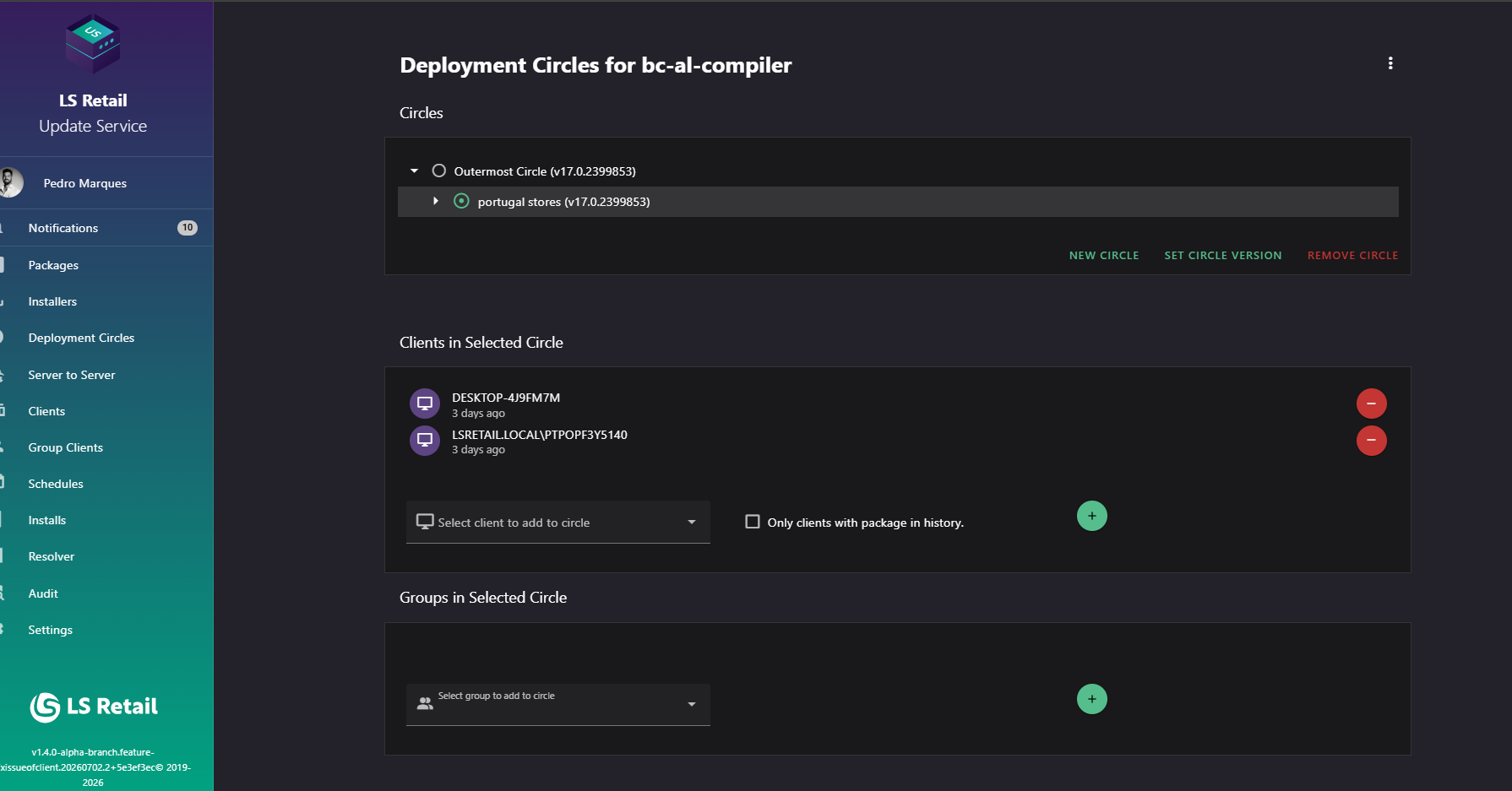
Figure: Deployment Circle Detail screen.
UI reference
| Element / Field Name | Type | Description & Triggered Action |
|---|---|---|
| More actions (⋮) | Button | Opens a menu with the Remove action for the whole deployment circle structure of this package. See Remove Deployment Circle. |
| Circles tree | Grid/Tree | Displays the outermost circle and all inner circles hierarchically, each labelled with its name and current version. Selecting a node loads that circle's members, groups, and available actions. Nodes with inner circles can be expanded or collapsed. |
| Outermost circle notice | Info banner | Shown when the outermost circle is selected, reminding the user that it automatically catches all clients not placed in an inner circle. |
| Clients in Selected Circle | Grid/List | Lists the individual clients directly assigned to the selected circle. Not shown/populated when the outermost circle is selected, since it has no explicit client list. |
| Groups in Selected Circle | Grid/List | Lists the client groups assigned to the selected circle. Not shown/populated when the outermost circle is selected. |
Manage circles
Use the circle tree to select a circle, create inner circles, set target versions, or remove an inner circle.
| Element / Field Name | Type | Description & Triggered Action |
|---|---|---|
| New Circle | Button | Opens the New Circle dialog to create an inner circle nested under the selected circle. Disabled until a package and parent circle are available. |
| Set Circle Version | Button | Opens the Set Circle Version dialog to change the target version of the selected circle. |
| Remove Circle | Button | Opens the Remove Circle dialog to delete the selected circle. Disabled when the outermost circle is selected. |
Create a circle
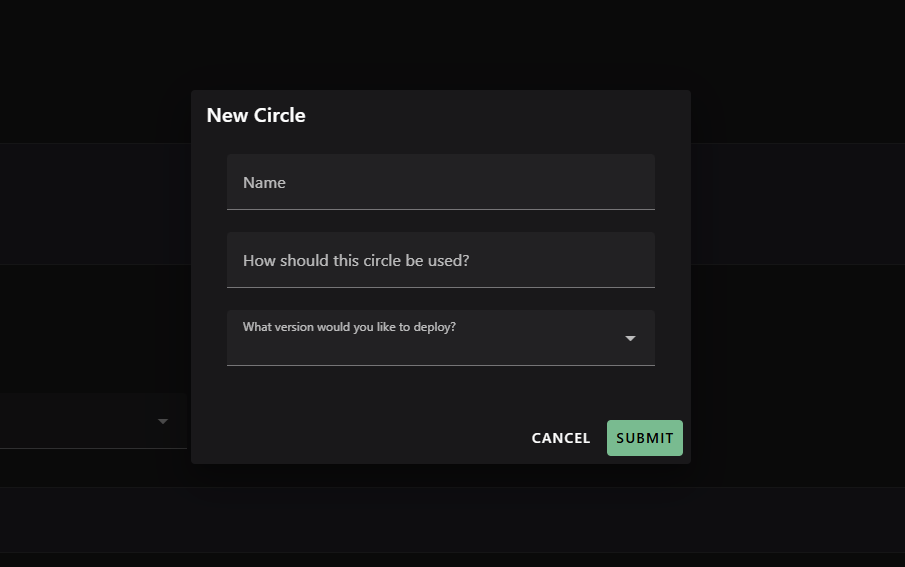
Figure: Interface overview for adding a new circle to an existing Deployment Circle.
- Enter a Name and How should this circle be used? description.
- Select What version would you like to deploy?.
- The new circle is created under the selected circle.
| Element / Field Name | Type | Description & Triggered Action |
|---|---|---|
| Name | Field | Name of the new circle. Required. |
| How should this circle be used? | Field | Free-text description of the circle's purpose. Required. |
| What version would you like to deploy? | Field (selector) | Package version assigned to the new circle. Required. |
| Cancel | Button | Closes the dialog without creating a circle. |
| Submit | Button | Creates the new circle nested under the currently selected circle. |
Set a circle version
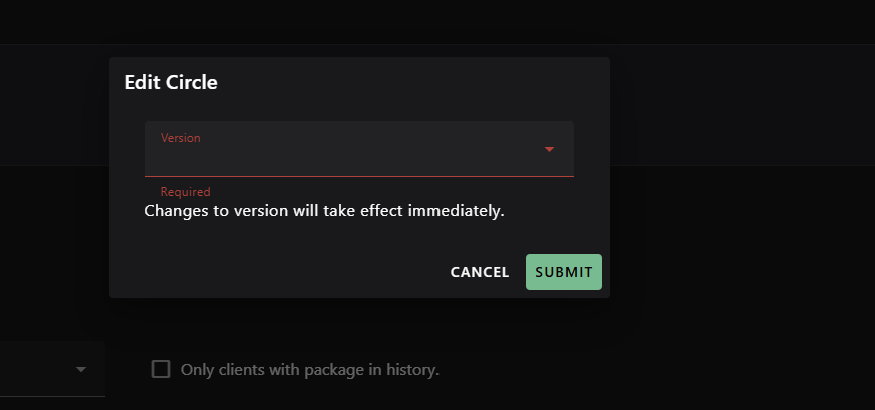
Figure: Interface overview for updating the version of an existing Circle.
- Select the required Version from versions available for the package.
- The change takes effect immediately for clients and groups in the circle.
| Element / Field Name | Type | Description & Triggered Action |
|---|---|---|
| Version | Field (selector) | The package version to deploy to the selected circle. Required. |
| Cancel | Button | Closes the dialog without changing the circle's version. |
| Submit | Button | Applies the selected version to the circle immediately. |
Remove a circle
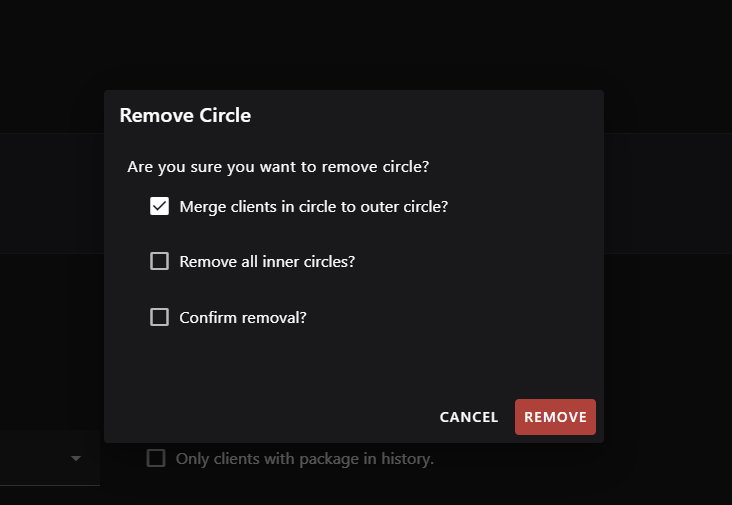
Figure: Interface overview for the removal of an existing Circle.
- Choose whether to move members to the parent circle and whether to remove inner circles.
- Select Confirm removal? before removing the circle.
- The outermost circle cannot be removed.
| Element / Field Name | Type | Description & Triggered Action |
|---|---|---|
| Merge clients in circle to outer circle? | Toggle (checkbox) | When enabled, clients/groups in the removed circle are moved to its parent circle. Enabled by default. |
| Remove all inner circles? | Toggle (checkbox) | When enabled, all circles nested under the selected circle are removed as well. |
| Confirm removal? | Toggle (checkbox) | Must be checked before the Remove action can be submitted. |
| Cancel | Button | Closes the dialog without removing the circle. |
| Remove | Button | Deletes the selected circle according to the chosen options, and refreshes the circle tree. |
Manage circle members

Figure: Interface overview for the management of clients in the Deployment Circle.
Manage clients assigned directly to the selected circle.
- Review clients assigned to the selected circle.
- Search for a client, optionally limit results to clients with the package in their installation history, and add it to the circle.
- This option is unavailable for the outermost circle.
- Confirm before removing a client.
| Element / Field Name | Type | Description & Triggered Action |
|---|---|---|
| Clients in Selected Circle list | Grid/List | Shows each client assigned to the selected circle with its label and last-seen time. Supports Previous Page / Next Page navigation. |
| Remove (client row) | Button | Opens a confirmation dialog to remove that specific client from the circle. |
| Select client to add to circle | Field (autocomplete) | Searches for a client by name to add to the selected circle; shows last-seen time for each match, with a Load more option for additional results. |
| Only clients with package in history. | Toggle (checkbox) | Filters the client search to only clients that already have this package in their installation history. |
| Add (client) | Button | Adds the selected client to the circle. |
| Remove Client (confirmation) | Dialog | Confirms removal of the named client from the circle before it is executed. |
Manage circle groups

Figure: Interface overview for the management of groups in the Deployment Circle.
Manage client groups assigned to the selected circle.
- Review groups assigned to the selected circle.
- Select a group, then add it to the circle.
- This option is unavailable for the outermost circle.
- Confirm before removing a group.
| Element / Field Name | Type | Description & Triggered Action |
|---|---|---|
| Groups in Selected Circle list | Grid/List | Shows each group assigned to the selected circle with its name and description. Supports Previous Page / Next Page navigation. |
| Remove (group row) | Button | Opens a confirmation dialog to remove that specific group from the circle. |
| Select group to add to circle | Field (selector) | Selects an existing client group to add to the selected circle. |
| Add (group) | Button | Adds the selected group to the circle. |
| Remove Group (confirmation) | Dialog | Confirms removal of the named group from the circle before it is executed. |